6 Blue Circular Mosaic Patterns: A Practical Design Asset for Professional Workflows
Design projects demand assets that balance visual impact with flexibility. The 6 Blue Circular Mosaic Patterns package offers a targeted solution for creators who need repeatable, high-quality motifs without starting from scratch. Whether you work in branding, digital publishing, product packaging, or content creation, this set of six circular mosaic designs provides a ready-to-use foundation that fits into a wide range of production pipelines.
The package includes six JPEG files at 5000x5000 pixels, six vector EPS files, and six vector AI files. That combination of raster and vector formats means you can move between print, web, and presentation workflows without rework. The blue palette adds a consistent visual theme while leaving room for color adjustments in your editing software.
Understanding the Asset Package and Its Role in Your Process
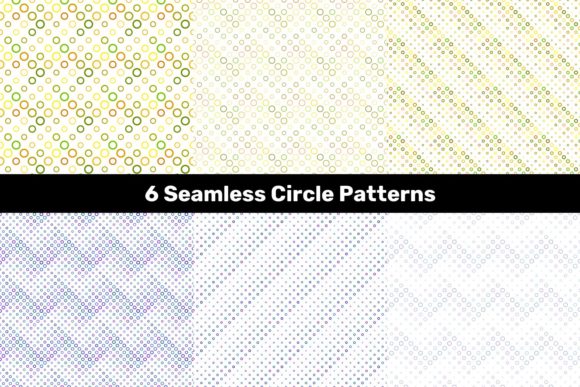
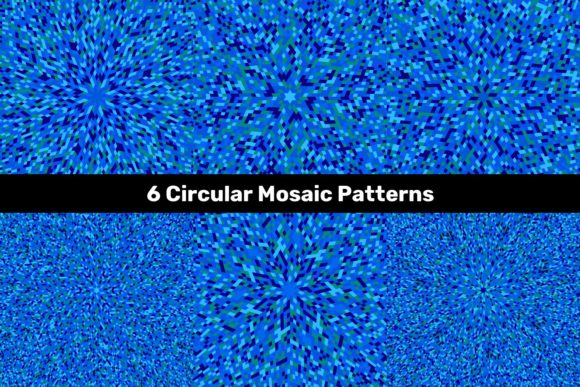
Before integrating any design resource into your workflow, it helps to assess what it delivers and where it fits. This pattern set is not a collection of generic textures—it is a focused library of six distinct circular mosaic compositions. Each pattern uses segmented geometric forms arranged in a radial layout, with blue tones that range from deep navy to soft cerulean. The result is a cohesive set that works well for backgrounds, accent elements, or full-surface applications.
The JPEG files come at 5000x5000 pixels, which gives you enough resolution for large-format printing up to about 16x16 inches at 300 DPI. The EPS and AI vectors are resolution-independent, so you can scale them to billboard size or shrink them to business card dimensions without quality loss. This dual-format approach supports both bitmap editing workflows and vector-based illustration or layout environments.
For professionals who manage multiple projects, having both formats eliminates conversion delays. You can open the AI files directly in Adobe Illustrator for custom editing, use the EPS files in QuarkXPress or CorelDRAW, and drop the JPEGs into Canva, PowerPoint, or Keynote when speed matters more than precision.
Where Blue Circular Mosaic Patterns Fit in a Creative Workflow
Every project has phases: research and planning, asset creation or sourcing, composition, refinement, and delivery. This pattern set belongs in the asset sourcing phase, but its influence carries through to composition and refinement.
During planning, you can review the patterns to decide which ones match your project's tone. The circular mosaic structure suggests order, symmetry, and craftsmanship—qualities that suit corporate presentations, educational materials, or wellness brands. If your project needs a calming yet structured background, a blue mosaic can anchor the visual hierarchy without competing with foreground content.
In the composition phase, the vector files allow you to recolor elements, extract individual segments, or combine patterns with typography and photography. The JPEGs work well as texture layers with blending modes in Photoshop or Affinity Photo. You can rotate, tile, or crop them to fit specific layout dimensions.
During refinement, consistency matters. Because all six patterns share a common design language and color family, you can use different patterns across different sections of a brochure, slide deck, or website without breaking visual continuity. This saves time compared to sourcing separate assets and then adjusting them to match.
Branding and Identity Projects
If you are developing a brand identity for a client in technology, healthcare, or professional services, blue mosaic patterns can serve as secondary graphics or brand textures. Use a single pattern as a watermark on stationery or apply it as a subtle background on social media templates. The vector files let you adjust opacity, scale, and color to align with the brand's exact palette.
For logo development, you might extract a small section of a mosaic to use as an icon element. Because the patterns are circular, they integrate well with round logos, badge designs, or avatar placeholders.
Digital Publishing and Social Media
Bloggers, content creators, and social media managers often need repeatable backgrounds that look polished without being distracting. The JPEG files at 5000x5000 pixels cover full-screen backgrounds on devices with high DPI displays. You can crop them to Instagram square, Facebook cover, or YouTube thumbnail dimensions and still retain sharp detail.
Consider using one pattern as a consistent background for a series of quote posts or educational carousel slides. The blue tone signals calm authority, which works well for finance, mental health, or coaching content. Rotate through the six patterns to create variety while maintaining a coherent feed aesthetic.
Print Materials and Packaging
For print, the vector formats are essential. Place an EPS or AI file into InDesign or Illustrator and scale it to your exact dimensions—whether that is a 4x6 postcard or an 18x24 poster. The 5000x5000 JPEG provides an alternative if your print workflow relies on raster images, but for best results at larger sizes, always use the vector.
Packaging designers can use the mosaics as wrap patterns for boxes, labels, or inserts. The circular geometry complements cylindrical containers like bottles or cans, and the blue palette works well with white or metallic substrates.
File Format Considerations for Different Workflows
Understanding when to use each format prevents unnecessary troubleshooting. The JPEGs are flattened, raster images with no transparency. They work best when you need a quick background or texture that does not require further editing of individual elements. Because they are 5000x5000 pixels, they are large enough for most digital and small-format print projects, but they will not scale up infinitely without pixelation.
The EPS and AI files are vectors, which means they contain mathematically defined paths. You can edit colors, rearrange shapes, delete sections, or combine elements from different patterns. These files are ideal when you need to customize the design for a specific client or project. They also export cleanly to PDF, SVG, or PNG at any resolution.
If you work in a mixed environment—say, designing in Illustrator and then moving to After Effects for motion graphics—the AI file preserves layers and grouping better than EPS. If you deliver assets to a printing service that prefers EPS, that format is already available. Having both reduces friction when collaborating with vendors or team members who use different software.
Organizing Digital Assets for Efficiency and Consistency
A pattern library is only useful if you can find and apply it quickly. When you download this package, take a few minutes to organize the files into your existing asset management system. Rename the files with descriptive terms like "blue_circular_mosaic_01.jpg" or "blue_circular_mosaic_dark_eps.eps" so you can search by color or style later.
Create a folder structure that separates raster from vector, or group them by color family if you have other pattern sets. If you use digital asset management software like Adobe Bridge, Eagle, or a cloud-based system, tag the files with keywords such as "blue," "circular," "mosaic," "geometric," and "pattern." This makes retrieval faster when you are on deadline.
Consistency also applies to how you edit the patterns. If you recolor a vector file for a project, save a copy with a version number or date. Avoid overwriting the original files so you can always return to the base design. Over time, you will build a library of variations that you can repurpose across clients and campaigns.
Long-Term Value and Reusability
The best design assets are those that solve a problem once and then continue to solve it for years. Because this pattern package is not tied to a specific trend or season, it remains useful across many projects. Blue is a perennial favorite in corporate and creative contexts, and circular mosaics have a timeless geometric appeal that does not date quickly.
Reusability also depends on the formats. Vector files do not degrade over time or with repeated exports. You can open an AI file from this package five years from now and it will still be fully editable. JPEGs are more fragile because they lose quality with every save, but if you keep the original 5000x5000 file untouched and only work on copies, the source remains pristine.
For freelancers and small business owners who manage tight budgets, buying a quality pattern set once and using it across multiple client projects improves return on investment. You are not paying per use, and you are not spending billable hours creating patterns from scratch. The six patterns in this package give you enough variety to avoid repetition while staying within a unified visual system.
Practical Tips for Smooth Integration
- Test scale early. Before committing to a pattern in a layout, test it at your final output size. What looks balanced on screen at 100% may feel too dense or too sparse at full print scale. Vector files let you adjust tile size easily.
- Use blending modes for depth. In Photoshop or Affinity, place a JPEG mosaic over a gradient or solid color and experiment with Multiply, Overlay, or Soft Light to create subsurface texture.
- Create a master color palette. Since all six patterns are blue, define a precise CMYK or HEX value that you want to use as the primary blue. Then adjust the vector files globally using the Recolor Artwork tool in Illustrator.
- Back up your asset library. Keep a copy of the original ZIP file in cloud storage and a local backup. If you customize files, store those separately with clear naming so you always have a clean original to fall back on.
- Share with collaborators mindfully. If you work with a team, decide on naming conventions and folder structure upfront. This avoids duplicated effort and ensures everyone uses the correct version of a pattern.
Matching the Patterns to Your Project Goals
Not every pattern suits every project, and that is fine. The six blue circular mosaics offer different densities and complexity levels. Some have tight, intricate segments that read as fine texture, while others have larger, bolder shapes that stand out as graphic elements. When selecting a pattern, consider the purpose of the surface it will occupy.
For backgrounds that need to recede behind text, choose a pattern with lower contrast and smaller segments. For hero sections or accent panels, pick a pattern with stronger visual rhythm and more defined shapes. The blue color family helps unify them, so you can use two different patterns on the same spread without it feeling mismatched.
If your project involves motion or video, the EPS and AI files can be imported into After Effects as vector layers for scalable animations. The circular structure lends itself to rotation effects, radial reveals, or pulsing motion. Blue tones translate well to video because they do not clip easily in common codecs.
Final Observations on Workflow Integration
The 6 Blue Circular Mosaic Patterns package is a practical addition to any designer's toolkit because it addresses a common gap: the need for ready-to-use, scalable, and cohesive backgrounds that do not require hours of manual creation. By providing both raster and vector formats at high resolution, it removes the friction of format conversion and allows you to move seamlessly between software and output mediums.
Whether you are preparing a client pitch, designing a product label, building a social media campaign, or creating educational handouts, these patterns give you a consistent visual foundation. The key to getting the most out of them is to treat them as raw material—customize, combine, and adapt them to fit your specific process. With six distinct patterns, you have room to rotate them across projects without exhausting your options, and the blue color scheme ensures they remain versatile across industries and audiences.
Integrating assets like these into your workflow is not about replacing your creative judgment. It is about reducing repetitive tasks so you can focus on the decisions that matter most: composition, messaging, and user experience. When you have reliable, high-quality patterns ready to go, you spend less time sourcing and more time building.