Sunflowers. Patterns and Frames Set: A Practical Asset for Streamlined Creative Workflows
Whether you are a graphic designer juggling client deadlines, a small business owner building a consistent brand presence, or a content creator preparing seasonal posts, the quality of your visual assets directly affects how your work is perceived. The Sunflowers. Patterns and Frames Set offers a structured collection of design elements that can simplify production, maintain visual consistency, and reduce repetitive preparation work. Instead of treating this as just another decorative pack, consider how its components—frames, seamless patterns, digital papers, and a banner—fit into a broader creative or business process.
This set is built around sunflower motifs, but the utility extends beyond a single theme. The combination of high-resolution JPEG and PNG files with transparent backgrounds means you can integrate these assets into nearly any workflow without cumbersome file conversion or background removal. Let’s walk through what the set contains, how you can use it across different stages of a project, and practical ways to make it a lasting part of your toolkit.
What the Set Contains and Why It Matters
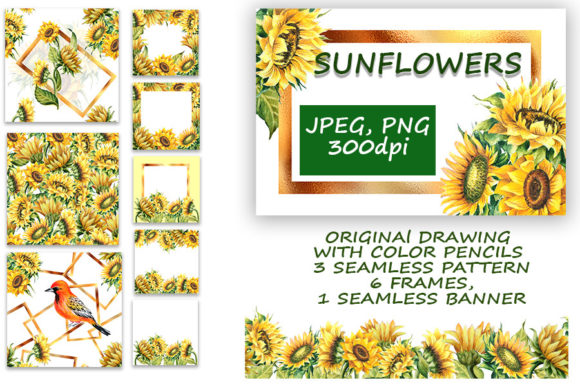
The Sunflowers. Patterns and Frames Set includes six frames in three common aspect ratios: 4500x3000 pixels, 5000x5000, and 3600x3600. Each frame is provided as a JPEG with a white background and a PNG with a transparent background. Transparent PNGs are essential for compositing—they allow you to layer frames over existing images, social media templates, product photos, or printed materials without manual masking.
Alongside the frames, you get three seamless patterns and digital papers, each 3600x3600 pixels as JPEGs on white. Seamless patterns tile infinitely without visible edges, making them usable for website backgrounds, fabric designs, wrapping paper, or digital scrapbooking pages. The set also includes one seamless banner, saved separately at 4105x1000 pixels in both JPEG (white background) and PNG (transparent). This banner size is practical for blog headers, email newsletter banners, or shop category images.
From a workflow perspective, having transparent and white-background variants of the same asset means you can use the JPEG version for quick mockups or print-ready files, and the PNG version for layered compositions where you need control over the background. This dual-format approach reduces the need to recreate or re-export files for different use cases.
Before the Project: Preparation and Asset Organization
Integrating any asset set into your routine starts with preparation. Before you begin a project, take time to understand how the Sunflowers. Patterns and Frames Set aligns with your upcoming tasks. Here are practical steps to prepare:
- Categorize by use case: Create folders for frames, patterns, and the banner. Within the frames folder, you might sub-sort by size (square, portrait, landscape) so you can quickly grab the right orientation.
- Review resolution requirements: The frame sizes cover standard print and digital needs. 5000x5000 pixels is comfortable for large format prints or high-detail digital work, while 3600x3600 works well for medium prints and web graphics. Know your output medium before you start designing.
- Check transparency needs: If your project involves layering frames over diverse backgrounds (e.g., product photos with varying colors), rely on the PNG versions. For projects where you want a clean white background behind the frame, the JPEG versions save a step.
- Plan pattern repeats: Seamless patterns tile seamlessly, but think about scale. A 3600x3600 pixel pattern tile can be scaled up or down in your design software. If you are designing for a large wall mural, test the pattern at actual size to ensure the repeat looks natural at the intended scale.
This upfront organization might take 15 minutes, but it pays back when you are working under deadlines and need to find the right element quickly.
During the Project: Integrating Patterns, Frames, and the Banner
Once you are in the middle of a project, the Sunflowers. Patterns and Frames Set can function as a flexible resource that adapts to changing requirements. Below are specific ways to weave these assets into your active workflow.
Frames for Composition and Framing
The six frames can be used as photo borders, text frames, or decorative containers. Because they come in multiple sizes, you can match them to your canvas dimensions without stretching or distortion. For example:
- Use the 5000x5000 square frame for Instagram posts or square product shots.
- Use the 4500x3000 landscape frame for blog featured images, YouTube thumbnails, or wide format print flyers.
- Use the 3600x3600 frame for smaller social media content or as a consistent repeating element across a series.
The transparent PNG version allows you to place the frame over any background—photography, solid colors, gradients, or the patterns from the same set. This creates a cohesive look without needing to manually cut out backgrounds.
Patterns and Digital Papers for Backgrounds and Textures
Seamless patterns are particularly valuable when you need consistent backgrounds across multiple pages or products. In the Sunflowers. Patterns and Frames Set, the three patterns are designed as digital papers (JPEG with white background) that can be used directly or modified. Here are practical applications:
- Website backgrounds: Use a subtle sunflower pattern as a repeating background for a lifestyle blog or an online store. Because the pattern is seamless, it tiles smoothly across screens of any size.
- Printed stationery: Design custom notebook covers, greeting cards, or wrapping paper by placing a pattern over a blank template. The 3600x3600 resolution ensures clean print results on most home and commercial printers.
- Digital scrapbooking or mood boards: Patterns add visual interest without requiring you to create textures from scratch. You can adjust opacity or blend modes in your design software to achieve the desired effect.
One workflow efficiency gain: because patterns are seamless, you can fill an entire canvas with one tile, then scale the pattern layer as needed. This avoids the hassle of manual repetition.
The Seamless Banner for Headers and Hero Sections
The included banner (4105x1000 pixels) is sized for common banner slots: websites, email headers, or social media cover images. Having it saved separately with both a white background and transparent background gives you flexibility. For instance:
- Use the JPEG version as-is for quick uploads to platforms that require a solid background.
- Use the PNG transparent version to overlay the banner on a custom gradient or image background, keeping only the sunflower motif visible.
If you maintain multiple brand accounts or seasonal campaigns, this banner can serve as a starting template. Swap out the background or adjust colors in your software to match your brand palette while keeping the sunflower frame and pattern aesthetic consistent.
After the Project: Archiving, Repurposing, and Quality Control
Once a project is complete, the Sunflowers. Patterns and Frames Set continues to provide value through repurposing and long-term archiving. Here is how to manage it post-project:
- Archive systematically: Store the set in a dedicated assets folder with clear naming conventions (e.g., “Sunflowers_Frames_Square_5000_Transparent.png”). This makes future retrieval fast, especially if you own multiple asset packs.
- Repurpose across seasons or campaigns: The sunflower theme suits summer, autumn, harvest, or nature-oriented content. You can use the same frames and patterns for different projects by changing accompanying images, colors, or typography. This extends the set’s useful life beyond a single use.
- Quality control check: After using the assets in a final layout, double-check that transparent PNGs export correctly without halos or leftover background pixels. If you scaled patterns significantly, verify that the tiling remains seamless. Catching issues during post-production saves time when you recycle the same asset later.
Usability Considerations Across Different Tools and Platforms
The Sunflowers. Patterns and Frames Set is format-agnostic in the sense that JPEG and PNG files work in virtually any design application: Adobe Photoshop, Illustrator, Affinity, Canva, GIMP, Procreate, and more. However, there are platform-specific tips to maximize efficiency:
- In Canva: Upload the PNG frames as transparent elements. You can resize and crop them directly within the editor. For patterns, upload the JPEG as a background image and tile it using Canva’s repeat feature (available in Pro). The banner can be uploaded as a header element and positioned behind text.
- In Adobe Photoshop: Use the PNG frames as smart objects so you can scale without losing quality. For patterns, define the JPEG as a pattern (Edit > Define Pattern) and use the Pattern Overlay layer style for instant tiling across any layer size.
- For web use: Compress the JPEG versions for faster loading without sacrificing resolution. The transparent PNGs are ideal for overlays where you want the sunflower frame to sit on top of a dynamic background.
- For print: The 5000x5000 pixel frame at 300 DPI yields roughly a 16.7x16.7 inch print area, which covers standard album, poster, or signage sizes. The banner at 4105x1000 pixels at 300 DPI prints about 13.7x3.3 inches—suitable for small banners or flyer headers.
Real-World Workflow Examples
To illustrate how the Sunflowers. Patterns and Frames Set fits into actual routines, here are three scenarios across different professional contexts:
Example 1: Freelance social media manager for a botanical brand
You need a cohesive set of Instagram posts for a two-week campaign promoting sunflower-themed products. You use the 5000x5000 square frame (transparent PNG) as a consistent border around product photos. For the post backgrounds, you use one of the seamless patterns at low opacity. The banner becomes the profile picture or story highlight cover. Because the assets are already sized and aligned, you can batch-create 14 posts in under two hours.
Example 2: Small business owner creating seasonal packaging
You run a craft store and want to offer sunflower-themed gift wrap and tags. The digital papers (patterns) serve directly as wrapping paper designs—print them at home or through a local print shop. The frames become decorative borders on product tags or price cards. Having both JPEG and PNG variants lets you use the white-background JPEG for simple prints and the PNG for layered tags with transparent backdrops.
Example 3: Educator designing classroom materials
You teach a unit on plants or harvest seasons and need visually appealing worksheets, bulletin board headers, and activity cards. The banner works well as a classroom header. The patterns can be printed as background sheets for student projects. The frames can hold student artwork or key vocabulary words. Because the files are high resolution, they print clearly on standard A4 or letter paper.
Long-Term Asset Management and Consistency
One often overlooked factor is how a themed asset set contributes to brand or project consistency over time. When you use the same frames, patterns, and banner across multiple deliverables—emails, social media, print, web—you create a visual thread that audiences recognize. The Sunflowers. Patterns and Frames Set gives you this consistency out of the box, without needing to design matching elements from scratch for each new initiative.
To maintain this consistency, keep a style guide or simple note about how you applied the set in past projects: which pattern you used for backgrounds, which frame size served as the primary border, and how the banner was positioned. This documentation prevents drift each time you reuse the assets.
Final Observations on Integration
Asset packs like this one are most valuable when you treat them as modular components in a larger process. The Sunflowers. Patterns and Frames Set saves time not because it contains beautiful images—though it does—but because its sizes, formats, and seamless properties align with real production needs. The transparent PNGs eliminate background removal steps. The multiple frame sizes reduce manual resizing. The seamless patterns remove the need to tile by hand.
Whether you are preparing assets before a project, assembling them during active design work, or archiving them for future reuse, this set can integrate into your routine with minimal friction. Start by organizing the files for your most common output size, experiment with layering the transparent frames over the patterns, and test the banner in your email or web templates. Over time, these small workflow adjustments add up to measurable efficiency gains and consistently polished results.