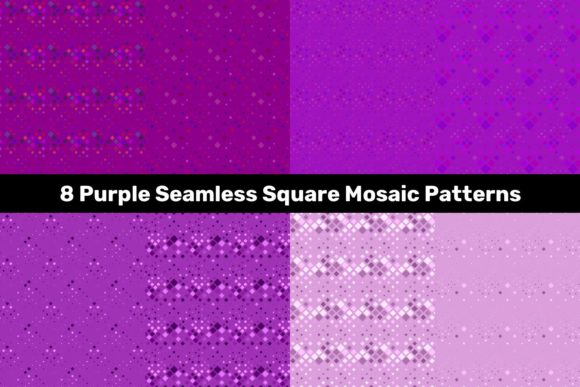
8 Purple Seamless Square Mosaic Patterns for Design Projects
Purple has a way of shifting a design from ordinary to memorable. It can whisper elegance in one setting and shout bold creativity in another. That flexibility makes the 8 Purple Seamless Square Mosaic Patterns a resource worth exploring, whether you are refining your brand aesthetic, building marketing materials, or working on a personal passion project. These patterns are not just individual tiles—each is a full square mosaic that repeats flawlessly, offering eight distinct looks in one download.
What you get in this package: eight JPG files at 5000x5000 pixels for high-resolution use, plus eight vector files in both EPS and AI formats. That combination means you can scale, edit, and adapt the designs without losing quality or fighting with pixelation. But what really matters is how these patterns perform when you put them to work in real projects.
Why Purple Mosaics Work Across Different Settings
Purple sits somewhere between cool and warm, which allows it to complement a surprisingly wide range of color schemes. It pairs naturally with gray tones for a professional look, with gold or yellow for a luxurious feel, or with white and soft pastels for a calm, modern vibe. The mosaic structure adds texture and depth without overwhelming the viewer. Because these patterns are seamless, they repeat evenly across any surface you apply them to, so backgrounds, wraps, and fills maintain a polished appearance.
For anyone juggling multiple design needs—say a small business owner updating social graphics one day and a product label the next—having a set of coordinated patterns saves time. Instead of sourcing separate assets and hoping they match, you open one package and get options that share a cohesive style.
Website and Digital Backgrounds
If you build or maintain websites, you know that background textures can make or break user experience. A flat color might feel incomplete, but a heavy pattern can distract from content. Purple mosaic patterns hit a sweet spot. They add enough visual interest to keep pages engaging while staying subtle enough for text overlays. A hero section with a deep purple geometric mosaic behind white headlines can look clean and dimensional at the same time.
Bloggers and content creators can use these patterns as section dividers. Instead of plain horizontal lines, a thin strip of mosaic pattern between blog sections gives the page a custom feel without needing complex code. The scalable vector files help here—you adjust the tile size in your CSS or design software so the pattern aligns perfectly with your layout.
Social Media Graphics and Templates
Purple performs well on social feeds. It stands out against the blue-heavy backgrounds of most platforms, which helps your posts grab attention. Freelancers managing multiple client accounts can build template sets around these mosaic patterns. For example, use one pattern as a recurring background for weekly quote posts, another for product announcements, and a third for behind-the-scenes content. The variety across the eight designs keeps the feed interesting, but the consistent mosaic texture ties everything together visually.
Marketers running seasonal campaigns can also adapt the files. Purple works for spring promotions, autumn events, and even holiday branding when paired with the right accents. Having the patterns in both raster and vector formats means you can drop a JPG directly into Canva or Photoshop for quick posts, or open the AI file in Illustrator for deeper customization when a client wants a unique spin.
Product Packaging and Labels
Small business owners selling physical products—candles, skincare, stationery, gourmet treats—often struggle with packaging that looks premium without costing a fortune to print. A well-chosen pattern can lift a simple box or label into something that feels designed. Purple mosaic patterns work especially well for products that aim for a sophisticated or artistic audience.
Consider a candle brand launching a lavender-scented line. Wrapping the candle in a soft purple mosaic pattern with gold foil accents creates a cohesive product look that customers notice on shelves. The 5000x5000 JPGs give you enough resolution for print, so you can scale the design to fit anything from a small label to a full box wrap without losing sharpness.
Digital Products and Printables
Educators and online sellers know that clean, attractive templates sell. If you offer digital planners, sticker sheets, wall art, or workbook covers, you can use these mosaic patterns as base designs. A digital planner for creative professionals might feature a purple mosaic header on each monthly spread. The texture adds a tactile feel to a digital product without increasing file size significantly.
Printables benefit particularly from the seamless format. Wall art prints, gift tags, greeting cards, and scrapbook pages all look more intentional when the pattern flows continuously. Because the package includes vector files, you can recolor elements to match specific themes. A teacher creating classroom decorations could take the AI file, shift the color from purple to blue, and suddenly the pattern fits a different unit or season.
Presentation Decks and Reports
Corporate presentations often suffer from being visually dry. A touch of pattern on a title slide or section divider changes the energy without looking unprofessional. Marketing consultants, educators, and business owners who present regularly can use purple mosaic patterns for slide backgrounds, infographic accents, or even as subtle watermarks on proposal documents.
Presenting a branding proposal to a client? A slide with a dark purple mosaic background and white typography signals confidence and creativity. The vector format means the pattern scales perfectly to widescreen formats, and you can adjust transparency so the texture supports the text instead of competing with it.
Fabric and Surface Design Mockups
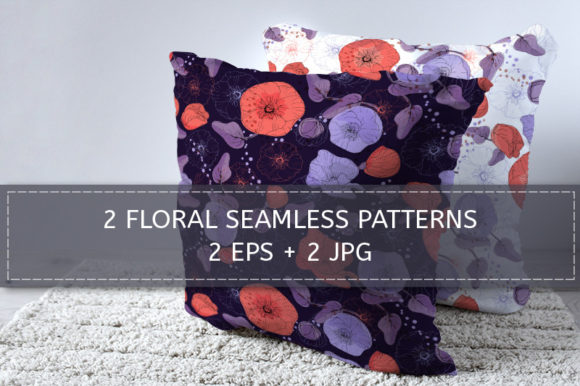
Hobbyists and designers who work with fabric, wallpaper, or surface patterns will appreciate the seamless nature of these files. You can drop a JPG into Spoonflower or similar print-on-demand services and see how the pattern wraps around pillows, curtains, or phone cases. Purple mosaics work well for home decor items aimed at modern or bohemian aesthetics.
For mocking up products before production, the high-resolution files give you enough detail to present realistic samples to clients or buyers. Even if you are just testing ideas for your own shop, changing the pattern scale in your design software helps you visualize how the mosaic looks at different tile sizes on a throw pillow versus a duvet cover.
What to Consider Before Using These Patterns
The strength of this set lies in its flexibility, but a few practical points help you get the most out of it.
Color matching matters when combining patterns with other design elements. Purple ranges from deep eggplant to soft lavender across the eight designs. Before committing to a specific pattern, pull the file into your project and check how it interacts with your existing color palette. The vector files make it simple to adjust hue or saturation if needed, but starting with the closest match saves time.
Scale is another factor. A mosaic that looks perfectly tiled on a phone screen might feel too busy on a banner or too sparse on a business card. Because the patterns are seamless, you can resize them freely. Test a few scale variations early in your project so you find the sweet spot for each application.
File format also guides your workflow. If you work mainly in raster-based tools like Photoshop or Procreate, the JPGs give you instant access. For vector-heavy workflows like logo design or large-format printing, the EPS and AI files let you manipulate individual elements without degradation. Keep all three formats in your asset library so you are ready for any project that comes in.
Who Benefits Most From This Set
Freelance designers handling multiple client brands can use these patterns as a reliable go-to resource. Instead of starting from scratch or purchasing expensive stock patterns for every project, you have a versatile set that adapts across industries. Entrepreneurs running their own marketing without a dedicated designer get professional-looking assets that require minimal editing. Hobbyists exploring print-on-demand or digital product sales can produce cohesive collections faster.
Educators creating course materials and classroom resources also gain from having high-quality, seamless patterns ready to insert into worksheets, slides, or virtual backgrounds. And bloggers or content creators who need consistent visual branding across posts, pins, and thumbnails will find that a repeating mosaic pattern creates instant recognition with their audience.
Making the Patterns Work in Your Actual Workflow
Think about the projects already on your calendar. Which ones could use a background or accent that feels polished but doesn't require hours of custom design? Maybe the social media calendar you are planning for next month, the product packaging you need to finalize, or the presentation you are building for a conference.
Drag one of the JPGs into a test file and try a few quick applications—a slide background at 50% opacity, a square Instagram post with text centered on the pattern, a label mockup with the mosaic wrapping around the sides. See how the pattern behaves when you scale it up or down. The seamless quality means you won't waste time fixing awkward seams or repeating tiles that don't line up.
For vector users, open the AI file and experiment with layer blending modes or gradient overlays. A soft gradient over a deep purple mosaic can create a dreamy background for a wedding invitation, while a sharp contrast overlay might give an edgy feel to event posters. The flexibility is there if you need it, but the patterns also work beautifully straight out of the box.
Why Quality and Format Matter for Long-Term Use
Investing in resources that come in multiple formats protects your work from platform limitations. A JPG works fine for web use and quick edits, but when a client suddenly needs a billboard-sized graphic, the vector files save you from scrambling for a new asset. Similarly, if you manage a library of design elements for a team, the AI files let everyone work directly on the source without compatibility issues.
The 5000x5000 resolution on the JPGs also means you can crop and zoom without sacrificing clarity. For print projects, that resolution supports output at decent sizes, and for digital work, you have more than enough pixels for retina displays or large monitors.
When you keep a set like this in your toolkit, you reduce the time spent searching for patterns and increase the time you spend actually creating. That shift matters whether you are selling products, building a brand, or just making something beautiful for yourself.