Terrazzo Patterns Pack: A Complete Guide to Seamless Vector and Raster Design Assets
Terrazzo is one of those design styles that never truly fades—it simply evolves. What began centuries ago as a practical flooring technique in Venice has become a beloved aesthetic in modern digital design, branding, and interior visualization. The Terrazzo Patterns Pack from Vector AI offers a comprehensive collection of seamless patterns designed to bring this timeless look into your creative workflow. Whether you're a graphic designer, web developer, or digital artist, understanding how to leverage these assets can elevate your projects with texture, depth, and a touch of artisanal charm.
This article explores everything you need to know about the Terrazzo Patterns Pack—from the file formats included to practical ways you can use and customize the patterns. By the end, you'll have a clear picture of how this pack fits into modern design work and why it deserves a place in your resource library.
What Is the Terrazzo Patterns Pack?
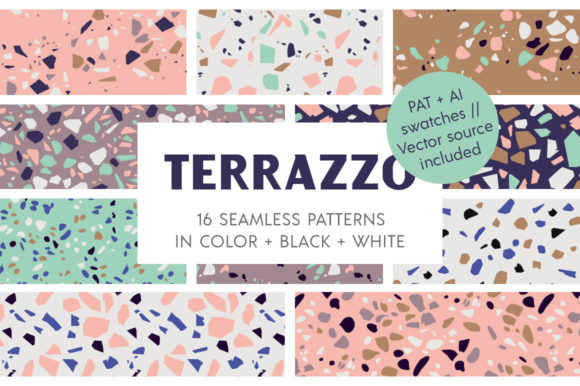
The Terrazzo Patterns Pack is a collection of seamless terrazzo-style textures available in multiple vector and raster formats. Designed to work across Adobe Illustrator, Adobe Photoshop, and other compatible software, the pack provides both flexibility and consistency. At its core, the pack contains carefully crafted speckled patterns that mimic the look of traditional terrazzo—small chips of stone or glass set into a cement or resin base.
Unlike single-use textures, these patterns are fully seamless. That means they tile infinitely without visible seams, making them ideal for everything from website backgrounds and product packaging to large-scale print projects and digital illustrations. The pack is organized into layers and swatches, so you can access each pattern individually or work with them as a set.
What's Included in the Pack?
The Terrazzo Patterns Pack is available in two distinct editions: one focused on color variety and another optimized for monochrome flexibility. Here's a breakdown of what you get in the full package:
Color Edition
- 1 Vector AI file with 16 seamless patterns, each on its own layer for easy editing
- 1 Vector EPS file with 16 seamless patterns, each on its own layer for compatibility with older software
- 1 Vector AI Swatch file with 16 seamless patterns pre-loaded in the Swatches panel
- 1 PAT Photoshop patterns file with 16 seamless patterns for use in Adobe Photoshop
- 16 JPG images at 300 dpi and 4000 x 4000 pixels, ready for print or web use
Monochrome Edition
- 1 Vector AI file with 16 seamless patterns (8 black, 8 white), each on its own layer
- 1 Vector EPS file with 16 seamless patterns (8 black, 8 white), each on its own layer
- 1 Vector AI Swatch file with 32 seamless patterns (16 black, 16 white) in the Swatches panel
- 1 PAT Photoshop patterns file with 32 seamless patterns (16 black, 16 white)
- 32 PNG images with transparent backgrounds, 300 dpi, 4000 x 4000 pixels each
Both editions are available in AI CC, AI CS, EPS CC, and EPS CS formats, ensuring broad compatibility across different versions of Adobe software.
Why Terrazzo Patterns Matter in Modern Design
Terrazzo has experienced a major resurgence in recent years. You've likely seen it on packaging, in branding materials, on website hero sections, and even in interior design mockups. The appeal lies in its ability to add visual texture without overwhelming other design elements. The small, irregular speckles create a surface that feels organic yet structured, handmade yet precise.
For designers, terrazzo patterns offer a way to introduce subtle complexity. A solid background can feel flat, while a terrazzo texture adds depth and interest without competing with typography or imagery. This makes it especially useful for:
- Brand identity systems – A terrazzo pattern can become a signature background or accent element that reinforces a brand's tactile, natural, or artisanal qualities.
- Web and UI design – Used sparingly, terrazzo textures can give digital interfaces a warmer, more grounded feel compared to flat colors or generic gradients.
- Print materials – Business cards, brochures, and packaging all benefit from the subtle richness of a terrazzo surface.
- Social media graphics – A terrazzo background can help your content stand out while maintaining a cohesive visual identity.
How to Use the Terrazzo Patterns Pack in Your Workflow
Understanding the file formats is the first step toward integrating the pack into your projects. Each format serves a specific purpose, and knowing when to use each one saves time and preserves quality.
Working with Vector Files (AI and EPS)
The vector files—both AI and EPS—are your primary tools for customization. Because the patterns are built as vectors, you can scale them infinitely without losing resolution. This is critical for both small icons and large-scale banners. Each pattern resides on its own layer, which means you can isolate, edit, or hide individual patterns without disturbing the rest of the file.
To edit a pattern in Illustrator, simply double-click the pattern swatch in the Swatches panel. This opens the pattern editing mode, where you can adjust the arrangement, scale, rotation, or colors of the speckles. The pack is designed so that you can change both the speckle colors and the background color freely, opening up endless creative possibilities.
Working with Swatch Files
The AI Swatch file is a time-saver. Instead of manually loading each pattern from a folder, you open the swatch file and find all 16 (or 32) patterns already available in your Swatches panel. This streamlines your workflow, especially when you're experimenting with multiple patterns in a single project. For the monochrome edition, the black and white patterns are organized separately within the same swatch panel, making it easy to switch between light and dark backgrounds.
Working with Raster Files (JPG and PNG)
For quick use in Photoshop or other raster-based software, the JPG and PNG files provide high-resolution ready-to-use textures. At 4000 x 4000 pixels and 300 dpi, these are suitable for print work up to about 13 x 13 inches at full quality. The PNG files in the monochrome edition come with transparent backgrounds, so you can layer them over any color or image without clipping issues. This is particularly useful for mockups, web assets, and compositing.
Using PAT Files in Photoshop
The PAT format is Photoshop's native pattern file. Once loaded, the patterns appear in the Pattern Fill dialog and can be applied as layer styles, fill layers, or brush textures. This is ideal for applying terrazzo textures to large areas quickly, or for using them as overlay effects in photo composites and digital paintings.
Customizing the Patterns for Your Projects
One of the strongest features of the Terrazzo Patterns Pack is the ability to customize. Because the patterns are built from vector components, you have full control over the color palette. Here are some practical ways to adapt the patterns:
Changing Speckle Colors
In Illustrator, double-click a pattern swatch to enter pattern editing mode. Here you can select individual speckle shapes or groups and apply new colors using the Swatches panel. You can create a monochrome look, a pastel palette, or a high-contrast combination—whatever fits your project. The pack's layered structure makes it easy to target only the speckles without affecting the background.
Changing Background Colors
The background of each pattern is a separate shape within the pattern definition. In editing mode, you can select the background rectangle and change its fill color. This allows you to match the pattern to your brand colors or to create a cohesive set of backgrounds for a series of designs.
Creating Custom Variations
Because the pack includes multiple patterns, you can mix and match speckle styles across different projects. You might use a dense speckle pattern for a bold accent wall in a room visualization, and a sparser pattern for a subtle texture on a business card. The 16 distinct patterns in each edition give you enough variety to keep your work fresh without starting from scratch.
Who Benefits from the Terrazzo Patterns Pack?
This pack is designed for a broad range of creative professionals. Here are a few examples of who might find it especially valuable:
- Graphic designers who need versatile, high-quality textures for branding, packaging, and print collateral.
- Web and UI designers looking for subtle background patterns that add warmth without distracting from content.
- Digital illustrators who want to incorporate organic textures into their artwork.
- Interior designers and architects creating visualizations that call for realistic terrazzo surfaces.
- Social media managers and content creators who need eye-catching, cohesive backgrounds for posts and stories.
Common Misunderstandings About Seamless Terrazzo Patterns
When working with pattern packs, some users assume that "seamless" means the pattern will automatically fit any space perfectly. While the pattern itself tiles without visible seams, you still need to set up the fill or placement correctly in your software. In Illustrator, apply the pattern as a fill to a shape, and ensure the bounding box is large enough to cover your intended area. In Photoshop, use the Pattern Fill layer and adjust the scale to match your canvas size.
Another common assumption is that vector patterns are always smaller in file size than raster ones. While vector files are generally more compact, high-resolution raster versions like the included JPGs and PNGs are essential for workflows that don't support vector pattern fills, such as certain web platforms or print-on-demand services. Having both formats in one pack eliminates the need to convert or regenerate textures.
Practical Tips for Getting the Most Out of the Pack
- Start with the swatch file. Loading the swatches first saves time and lets you preview patterns quickly before committing to one.
- Use the layer structure. The AI and EPS files with patterns on separate layers make it easy to copy a single pattern into your own project file.
- Experiment with opacity and blending modes. In both Illustrator and Photoshop, terrazzo patterns can be layered with reduced opacity or set to Multiply or Overlay for more subtle effects.
- Combine color and monochrome editions. If you own both editions, you can mix colored speckles with black-and-white backgrounds for unique hybrid looks.
- Scale appropriately. The 4000 x 4000 pixel raster files are generous, but for very large prints, you may need to scale them down in software rather than up, to maintain sharpness.
Conclusion
The Terrazzo Patterns Pack from Vector AI delivers a robust, flexible collection of seamless textures that bridge the gap between traditional craftsmanship and modern digital design. With multiple vector and raster formats, both color and monochrome editions, and full editability in Adobe software, it's a resource that adapts to your workflow rather than limiting it.
Whether you're designing a brand identity, building a website, creating social media assets, or preparing print materials, having a reliable set of terrazzo patterns at your fingertips can save time and open up new creative directions. The ability to change speckle and background colors means you're never stuck with a palette that doesn't fit. And with seamless tiling built into every pattern, you can apply them confidently at any scale.
Terrazzo design is more than a trend—it's a versatile aesthetic that continues to evolve with each new generation of designers. By understanding what this pack offers and how to use it effectively, you're well-equipped to incorporate this timeless texture into your own work.