Smart Strategies for Using Pirate Digital Papers Patterns
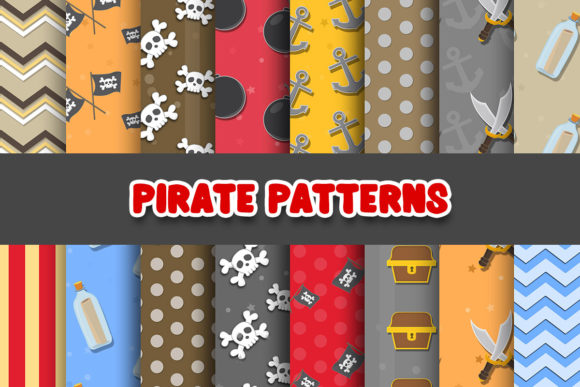
A great set of digital papers can save you hours of design work. When you find a collection of 16 Pirate Digital Papers Patterns, complete with skulls, anchors, and weathered textures, it is tempting to jump straight into your project. But rushing in without a plan often leads to disappointing prints, mismatched designs, or legal headaches if you are selling your work. This article covers the practical side of using these pirate-themed backgrounds. We will look at common mistakes, how to fix them, and what to check before you hit download. Whether you are a beginner scrapbooker or a small business owner creating invitations, these tips will help you get professional results every time.
Underestimating Print Specs and File Types
One of the biggest letdowns is a pixelated pattern. You see a beautiful skull texture on screen, but it prints blurry. This usually happens because the file resolution is too low. Always look for 300 DPI (dots per inch). This is the standard for crisp, professional printing. Also, check the file format. JPGs are great for photos but can lose quality. PNGs are better for digital layering because they can have a transparent background. If your software keeps crashing or the image looks distorted, the file might be corrupted or too compressed. Always do a test print on plain paper before using your expensive cardstock.
Misunderstanding Commercial Use Rights
This is a critical point for entrepreneurs, freelancers, and small business owners. Buying a digital paper pack does not automatically mean you can sell products made with it. Using a pattern without the proper commercial license can lead to a DMCA takedown or your shop being suspended. Read the license file carefully. Some creators allow unlimited commercial use, while others cap it at a certain number of sales. Others prohibit using the patterns in Print on Demand (POD) services. A high-quality set of Pirate Digital Papers Patterns will have a clear, easy-to-understand license. If it doesn't, ask the seller before buying.
Overlooking Pattern Scale and Theme Cohesion
Pirate themes are bold. A large skull pattern can look amazing on a poster but overwhelming on a small birthday card. Another common mistake is using too many patterns at once. Think about hierarchy. Pick one dominant pattern for your main background. Select a secondary pattern for an accent, like a banner or border. Use a solid color or simple texture for the rest. This creates balance and makes your design easy to read. For example, use a themed stripe for the background, a treasure map pattern for a photo mat, and a solid dark navy for the text area. Before you start, check the scale. If the pattern looks too busy, scale it down in your software.
Neglecting Color, Texture, and Readability
A stunning texture can make your project look premium, but it can also make text impossible to read. Common issues include dark skull patterns behind black text or overly bright colors that clash. Use the color palette provided in the pack. Stick to blacks, whites, reds, golds, and blues. For text, use a solid-colored text box or a strong drop shadow. In design tools, try lowering the opacity of your pattern layer or using a blend mode like Multiply to create a vintage, faded look. This keeps the pirate vibe without sacrificing readability.
Failing to Organize Before Starting
You have downloaded your digital papers. They are in a zip file named "Files(1).zip." This is a recipe for wasted time. Immediately after downloading, rename your files. Instead of "IMG_001.jpg," use names like "Pirate_Skull_Red.jpg" or "Treasure_Map_Texture.jpg." Create a dedicated folder on your computer or cloud drive. This small habit saves you from hunting for files when you are in the middle of a creative flow.
How to Evaluate a Pack Before You Buy
Before you add a pack to your cart, look for these details:
- Number of Designs: Does it have enough variety? A pack of 16 Pirate Digital Papers Patterns should have a good mix of icons, textures, and solids.
- File Specs: Are they at least 12x12 inches at 300 DPI? This ensures you can print them at standard scrapbook sizes.
- Color Quality: Do the colors look cohesive? A cohesive palette makes it easy to mix and match.
- Customer Proof: Look at reviews. Are customers happy with the print quality? Did they find the patterns easy to use?
A Simple Workflow for Better Results
To get the most out of your purchase, follow this process:
- Organize: Unzip, rename, and sort your files.
- Plan: Choose 2-3 patterns and 1-2 solid colors for your project.
- Test Layout: Place your patterns on a mockup or blank canvas. Check the scale and spacing.
- Check Readability: Add your text. Make sure it contrasts well with the background.
- Test Print: Print one page on plain paper. Check the colors and sharpness.
- Final Print: Use your best paper and high-quality printer settings.
This workflow removes guesswork and reduces wasted materials.
Pirate Digital Papers Patterns are more than just pretty backgrounds. They are a tool that can elevate your creative projects, whether you are making a birthday invitation, a scrapbook layout, or a product for your shop. By avoiding common mistakes like ignoring resolution, skipping the license, overwhelming your layout with too many patterns, or forgetting to test your prints, you set yourself up for success. Take a few extra minutes to plan and organize. Your future self—and your customers—will thank you for the polished, professional result.