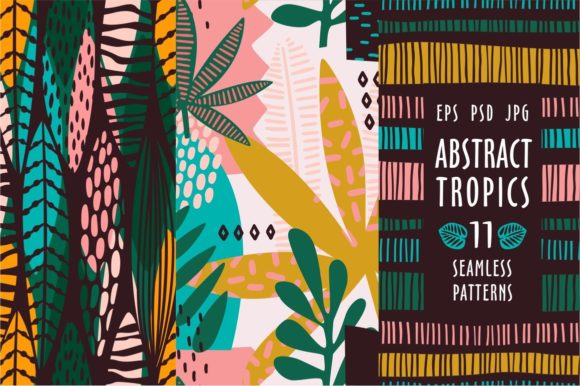
Abstract Tropics. 11 Patterns for Creative Projects
Design resources arrive with a promise. Some deliver. Others leave you searching for missing files or struggling with formats that do not fit your workflow. Abstract Tropics. 11 Patterns stands apart because it offers more than a collection of tropical leaf motifs. It provides a complete toolkit with vector, raster, and editable layer files, all built around hand-drawn texture and seamless repeatability. Whether you are designing packaging, building a brand identity, teaching a workshop, or decorating a personal space, this set meets you where you work.
What Abstract Tropics. 11 Patterns Actually Includes
The set contains eleven distinct seamless patterns inspired by tropical foliage. Each pattern uses hand-drawn linework and texture rather than flat, mechanical vectors. The result is a natural, organic feel that mimics the subtle imperfections of ink on paper. You receive three file formats per pattern: EPS 10 for scalable vector editing, PSD with preserved layers for Photoshop work, and JPG at 300 dpi for immediate use in presentations or mockups. This combination means you can resize a pattern to billboard scale without losing crispness, drop it into a layered composite, or print it directly from the JPG with professional resolution.
The seamless nature of each pattern matters for real-world use. When you tile the design across a surface, the edges join invisibly. No visible seams, no awkward repeats. This is essential for wrapping papers, fabric prints, website backgrounds, or any surface where continuity creates polish.
Beginners and Hobbyists Value Immediate Usability
If you are new to design software, file formats can feel like a barrier. Abstract Tropics. 11 Patterns lowers that barrier by including high-resolution JPGs that open in any image viewer or basic editing program. You do not need expensive software to start using the patterns. A hobbyist making greeting cards for a friend can open the JPG, resize it, and print directly. A beginner learning Photoshop can explore the PSD files to see how layers work without building a pattern from scratch. The hand-drawn aesthetic forgives minor alignment errors because organic texture looks intentional even when placement is imperfect.
For someone exploring a creative hobby, the cost of assembling individual tropical motifs from stock libraries often exceeds the price of a curated set. This collection eliminates that guesswork. You get eleven coordinated patterns that work together, so mixing and matching across a project feels cohesive rather than chaotic.
Professionals Need Precision and Flexibility
Experienced designers and art directors evaluate resources differently. Speed and reliability become primary concerns. When you work under client deadlines, digging through disorganized files or struggling with broken vectors wastes billable hours. The EPS 10 format is a professional standard. It preserves vector paths, shapes, and strokes exactly as the artist drew them. You can edit individual leaves, adjust stroke weights, change colors globally, or combine elements from different patterns to create custom composites. The hand-drawn texture remains intact because it exists as vector strokes rather than raster fills that pixelate when scaled.
A branding professional developing packaging for a wellness product can take one pattern, strip its original color palette, and recolor it to match brand guidelines without losing the organic feel. A surface pattern designer working on repeat prints can open the EPS, examine how the seamless repeat was constructed, and adapt the technique for original work. The PSD files provide layered access to textures and backgrounds, which matters when compositing patterns into product mockups or environmental renderings.
Educators and Workshop Leaders Look for Teaching Value
Teaching design principles often requires clear examples that students can deconstruct. Abstract Tropics. 11 Patterns works as a teaching tool because the hand-drawn quality makes the difference between vector smoothness and organic texture immediately visible. An instructor leading a class on pattern design can show the EPS file to explain how seamless repeats function. The PSD layers help students understand how to build complex textures from simple linework. The JPG versions serve as reference material for students who are not yet comfortable with vector software.
For a workshop focused on tropical or botanical themes, the set provides ready-made inspiration. Students can study how the artist varied leaf shapes, distributed visual weight, and balanced negative space. The patterns become case studies rather than just assets.
Small Business Owners and Entrepreneurs Consider Commercial Viability
If you run a product-based business, design resources directly affect your bottom line. Abstract Tropics. 11 Patterns offers commercial usability because the files are resolution-independent. You can use a single pattern across product labels, website banners, social media graphics, and printed marketing collateral without buying multiple licenses or reformatting. The JPGs at 300 dpi print cleanly on packaging materials, while the EPS files give you the freedom to resize for large-format displays like booth backdrops or window decals.
A small business selling natural skincare products might use one pattern as the primary label design and a complementary pattern for inserts or tissue paper. The seamless construction ensures that if you need to wrap a product in patterned paper, the repeat looks professional rather than patchwork. The hand-drawn texture aligns well with brands built around natural, artisanal, or botanical identities. It avoids the sterile look of purely geometric digital patterns.
Practical Examples Across Different Projects
Consider a freelance illustrator preparing a portfolio piece. Opening the EPS files allows you to isolate individual leaf elements and incorporate them into a larger illustration. The hand-drawn strokes blend naturally with your own linework, saving hours of drawing time while maintaining a consistent aesthetic. You might combine leaves from two patterns to create a custom wreath or border that feels original.
A marketing blogger designing a lead magnet cover can drop a JPG into Canva or similar tool, adjust opacity, and use it as a background texture. The high resolution means the pattern stays sharp even when printed as a workbook cover. The organic lines add warmth that photographs sometimes lack, especially in digital-focused industries where authenticity matters for audience trust.
A print-on-demand seller testing new product concepts can use the patterns across multiple mockups without re-editing. Upload the JPG to a print provider for tote bags, then use the same pattern as a laptop skin design. The seamless repeat prevents misalignment at different product dimensions. This speeds up product testing and reduces the time between concept and listing.
A home crafter making decoupage projects can print the JPGs on standard paper and apply them to trays, boxes, or coasters. The 300 dpi resolution ensures that the texture remains visible and print grain stays minimal. The tropical theme works well for seasonal decor or gifts, and having multiple patterns means each project can feel distinct without requiring new design work.
Assessing If This Set Matches Your Needs
Abstract Tropics. 11 Patterns suits projects where organic texture and tropical themes align with your goals. The hand-drawn quality sets it apart from stock vector collections that feel identical. If your work requires clean, geometric minimalism, these patterns may feel too detailed. If you need photorealism, they will not replace photographs. But if you want illustrated natural motifs that look intentionally crafted, the set delivers.
Evaluate your typical file format needs. If you work entirely inside raster software like Photoshop or Procreate, the PSD and JPG files serve you well. If you use vector software like Illustrator or Affinity Designer, the EPS 10 format gives you full editing control. If you switch between both, having all three formats eliminates conversion headaches.
Consider the learning curve. Beginners benefit from the ready-to-use JPGs. Intermediate users gain flexibility from the PSD layers. Advanced users unlock the full value of the EPS vectors. No single format limits anyone, but your comfort level with each determines how quickly you can apply the patterns to your work.
The commercial usefulness depends on how you plan to deploy the designs. For one-off personal projects, the JPGs suffice. For branded product lines or client work, the vectors become essential because they allow exact color matching and dimensional scaling. The set scales with your ambition.
Long-term usefulness comes from the seamless repeats and coordinated aesthetic. Because the patterns belong to one stylistic family, you can build a visual system around them. A website banner uses one pattern, social posts use another, and printed materials use a third, yet everything feels connected. This coherence is difficult to achieve when pulling individual assets from separate sources.
Making the Most of Abstract Tropics. 11 Patterns
Start by opening the JPGs in any photo viewer to see the full range of designs. Identify which patterns resonate with your current project and which might serve future work. Then open the corresponding EPS or PSD file to understand how the pattern is constructed. The hand-drawn texture is not trapped in a flattened image. You can see the strokes, adjust them, and learn from them.
If you are using the patterns for branding, choose two or three that share similar line weights or leaf shapes. Use the dominant pattern for primary surfaces and the others for accents. The cohesion built into the set makes this pairing natural rather than forced. If you are using them for personal creative exploration, try combining a pattern with a solid color block or a typographic element. The organic lines contrast well with clean typefaces, creating visual interest without overwhelming the composition.
For print projects, run a test print of the JPG before committing to large quantities. While 300 dpi is standard for most commercial printing, checking color and resolution on your specific paper stock saves waste. For digital projects, compress the JPGs appropriately for web use, or export from the EPS at the exact pixel dimensions your platform requires.
Abstract Tropics. 11 Patterns offers practical versatility wrapped in hand-drawn warmth. Whether you are launching a product, teaching a class, designing a brand, or simply making something beautiful, the set provides a foundation that adapts to your skill level and ambition. The real value lies not just in the patterns themselves, but in the time you reclaim and the creative paths they open.